Some features of TQM Enterprise depend on the system being granted more permissions in the browser.
We therefore recommend that the address "* .tqmenterprise.no" is added to the Trusted Sites zone. Once this is done, you will experience some issues are resolved, such as opening reports in the statistics. There will also be fewer alerts when editing documents.
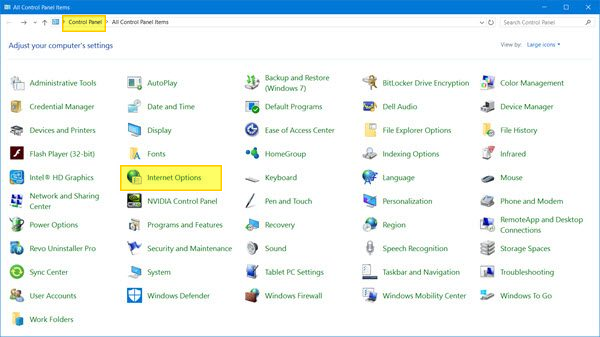
Open "Control Panel" on your PC, go to "Network and Internet" and open "Internet Options". You can also search for "Internet Options" in the search box at the top right corner of the Control Panel.
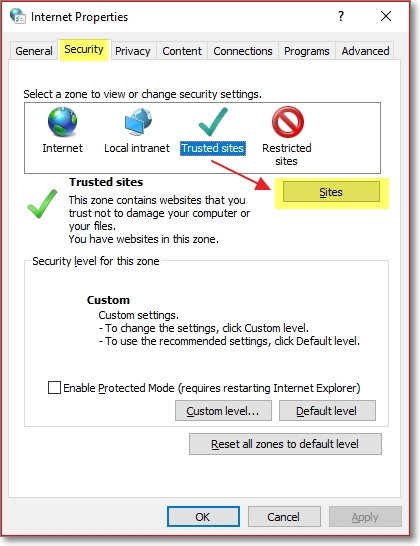
In the window that opens, select the Security tab. Select Trusted sites and go to Sites.
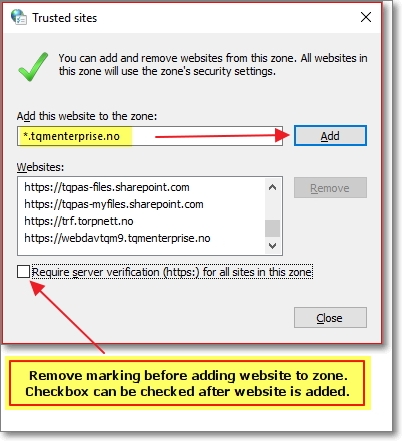
Uncheck "Require Server Authentication (HTTPS ...)").
Enter the following in the top box:
*.tqmenterprise.no
Then click Add
Issues remains?
Try this:
- Save document locally with another file type
- Update Trust Center settings